When One Driver Takes Down Everything: The Anatomy of a Cascading Cluster Failure

The call came in before anyone was at their desk. Monitoring fired at 1:18 AM on a
Monday - Agent Status Failed on a production Hyper-V node. By the time I was onsite the next morning, that single alert had become a two-day recovery operation involving driver surgery, registry obliteration, a Windows repair install, and a cluster certificate problem nobody warned me about.
This is article one of three. It covers what failed, why it cascaded the way it did,
and what the architecture taught me about single points of failure that look like
redundancy until they aren't.
The Environment
Two Dell PowerEdge servers running Windows Server 2019 Datacenter in a two-node Hyper-V failover cluster. Call them HV01 and HV02. Shared storage via iSCSI to a Dell PowerVault SAN - three LUNs, MPIO with Round Robin with Subset, two Cluster Shared Volumes. Production workload: domain controllers, Exchange, file servers, a phone system, security appliances. Everything a small organization depends on, running across two hosts with cluster failover as the safety net.
Each node had six QLogic network ports across three physical adapters:
- Two ports from a QLogic QL41232HQCU integrated adapter (embedded on the board)
- Two ports from a QLogic QL41262-DE in Slot 1
- Two ports from a QLogic QL41262-DE in Slot 3
Those six ports were organized into three LBFO NIC teams:
- OS_Management - both integrated ports, IP on the management subnet, default gateway, DNS - the network every remote management tool, RDP session, and cluster heartbeat path depended on
- Hyperv_Guest - both Slot 1 ports, no IP directly, the physical adapter
underlying the Hyper-V external vSwitch that carried all VM traffic plus a
management OS vNIC - Storage_Network - both Slot 3 ports, dedicated to iSCSI, the only path to
the SAN
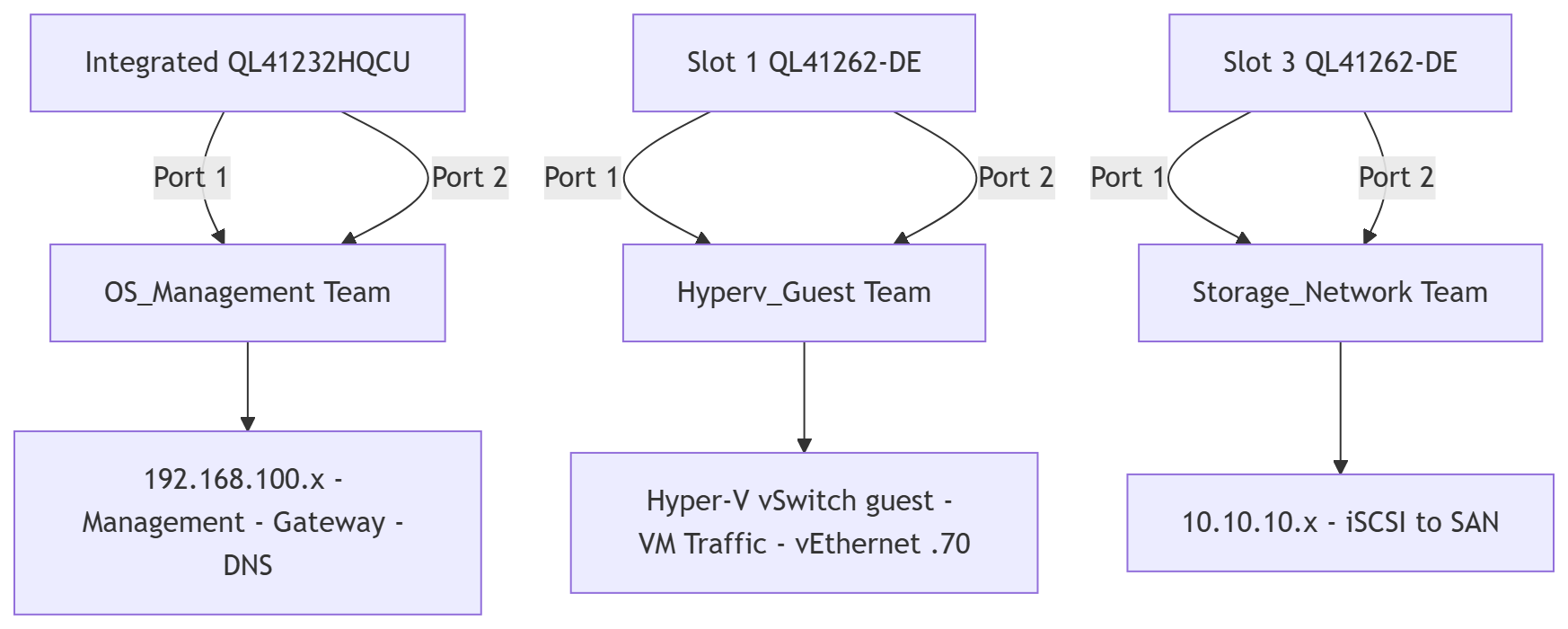
Each team was SwitchIndependent with Dynamic load balancing. Each team had one active port and one dark port - physically disconnected, no cable. Normal for this class of deployment. Teams show Degraded in that state but they work. One active member is enough.
Two Broadcom NetXtreme Gigabit Ethernet adapters lived on the motherboard. Both physically disconnected. Neither in any team. Neither in any plan.
That last detail matters more than anything else in this story.
The Driver Stack
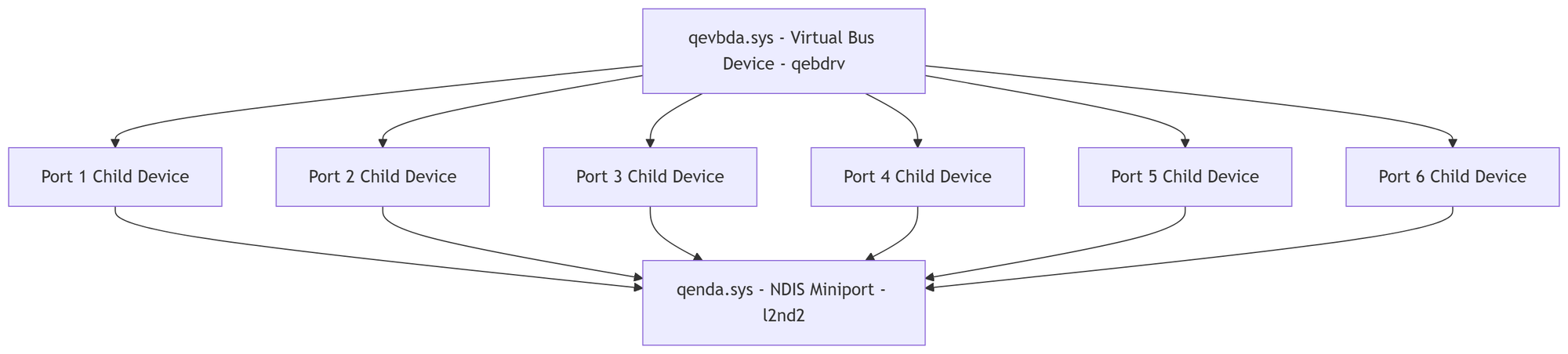
The QLogic FastLinQ adapters on Windows Server use a layered driver architecture.
The virtual bus device driver, qevbda.sys, service name qebdrv, loads first and
acts as a parent bus enumerator. It presents child device instances to the operating
system. Those child devices are then bound to the NDIS miniport driver - qenda.sys, service name l2nd2 - which is the actual data path. Every network frame that moves through a QLogic port on this server goes through l2nd2.
The critical thing to understand: all six QLogic ports share this same miniport
driver. The QL41232HQCU integrated ports and both QL41262-DE slot adapters all bind to the same l2nd2 service instance. They are independent physical hardware. They are not independent from a driver perspective.
That is the architecture detail that made this incident what it was.
The Failure
At some point before our monitoring caught it, the l2nd2 NDIS miniport driver on
HV02 entered a failed state. Device Manager reported Error Code 10 and Code 56 across all six adapter instances simultaneously. Not sequentially. Not one port at a time.
All six, at once, with the same error.
Code 56 is specific: "Windows cannot load the device driver for this hardware because a previous instance of the device driver is still in memory." The NDIS subsystem could not initialize the miniport. Whatever was wrong was wrong at the class level, not the device level. Every adapter that tried to bind to l2nd2 hit the same wall.
What followed was not six separate failures. It was one failure, expressed six times.
The Cascade
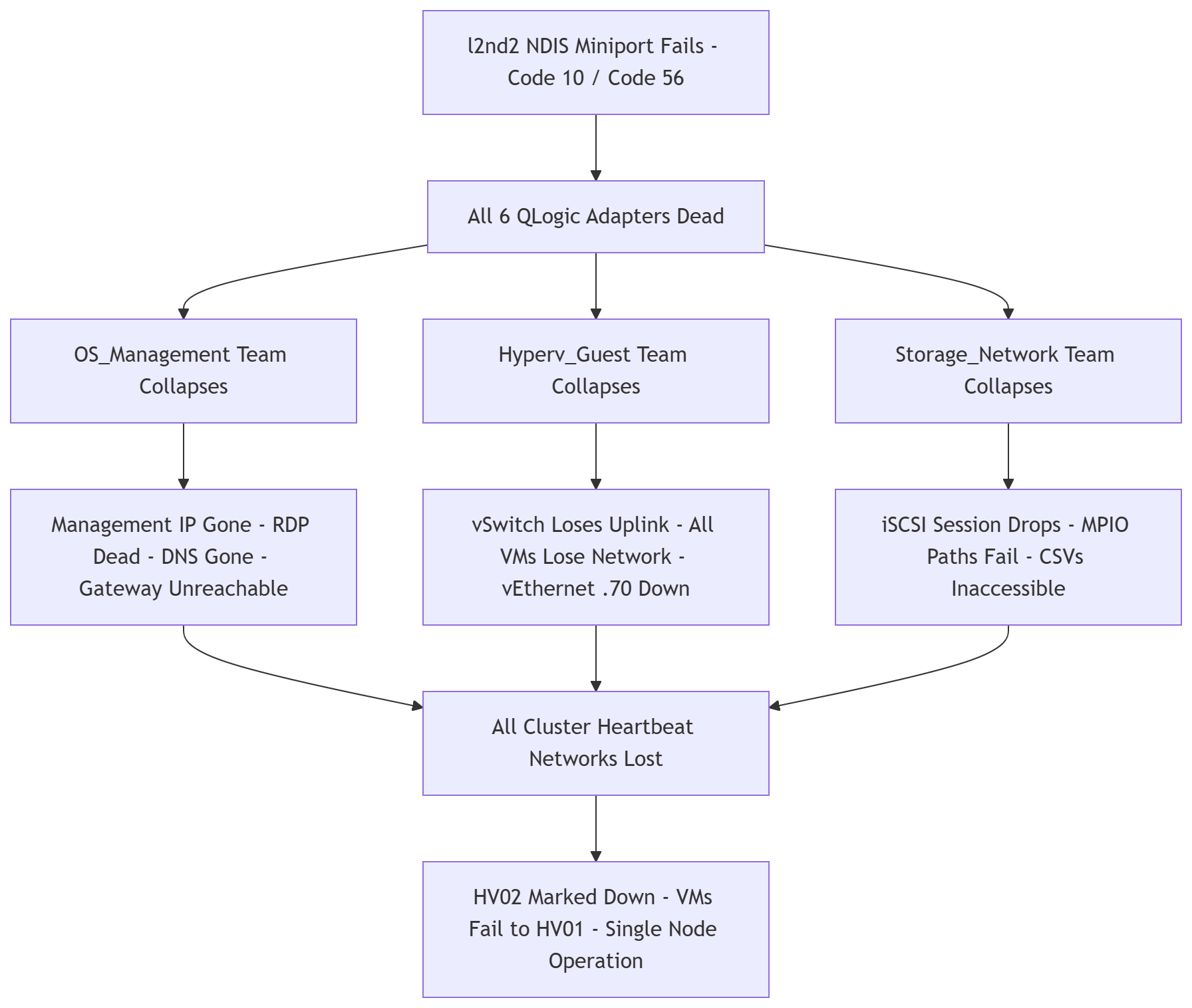
Here is the sequence, in order, as fast as dominoes.
Step 1: All six QLogic adapters report Error Code 10/56.
The l2nd2 miniport fails to initialize. No network frames can move through any
QLogic port. The hardware is fine. The bus devices load correctly. But without a
working NDIS miniport, the adapter instances cannot participate in any network
activity.
Step 2: OS_Management LBFO team collapses.
LBFO detects that both member adapters - Integrated NIC 1 Port 1 and Port 2 - have failed. The team goes down. The management IP address disappears. The default gateway becomes unreachable. DNS stops resolving. Every remote management path to HV02 - RDP, WinRM, WMI, PowerShell remoting - dies simultaneously. The server is now reachable only through the iDRAC out-of-band management interface.
Step 3: Hyperv_Guest LBFO team collapses.
Both Slot 1 ports fail. The team loses both members. The Hyper-V external vSwitch
was bound to this team as its physical uplink. With the team down, the vSwitch has
no path to the physical network. All virtual machines running on HV02 lose network connectivity. The management OS vNIC on that vSwitch - carrying the secondary cluster heartbeat address - also goes down.
Step 4: Storage_Network LBFO team collapses.
Both Slot 3 ports fail. The storage network goes dark. The iSCSI initiator loses its
network path to the SAN. The persistent iSCSI session drops. All three MPIO paths
to the PowerVault fail. The Cluster Shared Volumes become inaccessible from HV02.
The disks are still there, still healthy, still online on HV01 - HV02 simply cannot
reach them.
Step 5: The cluster loses HV02.
With every cluster network gone - management, VM, storage - HV01 stops receiving heartbeats from HV02 on all paths simultaneously. The cluster marks HV02 as Down.
Virtual machines that were running on HV02 either fail over to HV01 or enter a
SavedCritical state. The cluster drops to single-node operation.
Step 6: Monitoring fires.
I get the alert. The node has been degrading for some time before this point.
By the time the first alert hits the queue, the cascade is already complete.
Total time from driver failure to complete node loss: seconds. Not minutes. Seconds.
LBFO detects member failures fast. The cluster detects heartbeat loss fast. There was no slow degradation to catch. It was a cliff.
The Architecture Problem
Look at that cascade again and find the single point of failure.
It is not the driver. Driver corruption happens. It is the fact that every production
network path on this server ran through the same driver stack. The OS_Management team, the Hyperv_Guest team, the Storage_Network team - three teams, six ports, three physical adapters, one NDIS miniport service binding them all together.
LBFO provides redundancy within a team. Two ports fail over to one port when a cable pulls or a switch port dies. That is real redundancy and it works. But LBFO does not protect against a driver-level failure that affects all members of all teams
simultaneously. When the failure is in the software, having more hardware of the same type does not help.
The Broadcom NICs were the answer to this problem. They were physically present. They used a completely separate driver stack - b57nd60a.sys, nothing shared with QLogic.
They would have been completely unaffected by the l2nd2 failure. If even one Broadcom port had been cabled and assigned a management IP, I would have had remote access to HV02 throughout this entire incident without depending on iDRAC virtual media. The repair could have started the same night instead of the following morning.
They were dark. No cable. Not in any team. Not in any plan.
That is the gap.
What the Cluster Did Right
Worth stating clearly: the failover cluster worked exactly as designed.
HV01 detected HV02's absence and took ownership of the Cluster Shared Volumes. Most production VMs migrated or were already running on HV01. The cluster continued operating. Users experienced no outage. Nobody's Exchange went down. Nobody's domain controller went offline. The organization ran on one node instead of two, with reduced redundancy but full functionality.
That is what a two-node cluster with shared storage is supposed to do. It did it. The design held under a failure mode it was built for.
What it was not built for - what no cluster of two nodes is built for - is losing both
nodes simultaneously. During the time HV02 was down, a failure on HV01 would have been a full outage. That exposure is the real business risk, and it existed for two days while I recovered HV02.
The Takeaways
Single-vendor NIC deployments need a fallback path.
If every production adapter on a host shares a driver, a driver failure is a total
network loss. Cable the out-of-band NICs. Assign them a management IP on a separate VLAN or even just the management network. They do not need to carry production traffic.
They need to carry your RDP session when everything else is broken.
LBFO redundancy is link-layer redundancy, not driver-layer redundancy.
Two ports in a team survive a cable pull. They do not survive a driver that cannot
initialize. Know what layer your redundancy actually operates at.
Monitoring caught the failure but not the degradation.
The first alert fired on node status. By then the cascade was complete. More granular monitoring on NIC team member status and iSCSI session state would surface problems earlier - a single team member going failed, an iSCSI path dropping - before the full node is gone. Those signals are available. We were not watching them.
Two days of single-node operation is a real risk period.
The cluster held. But the window between HV02 going down and HV02 coming back was roughly 48 hours where a second failure would have been catastrophic. Recovery speed matters. Anything that slows it down - no out-of-band access, no documented runbook, no driver export on hand - extends that window.
The next article covers what actually happened during those two days of repair
attempts: the driver surgery, the LBFO registry battle, the SentinelOne dead end, and the moment netcfg -d turned a contained problem into a total network collapse.
That one gets ugly.