The NDIS Corruption Rabbit Hole: Ten Hours of Repair Attempts That Failed

Day one ended with a phone call to Dell Pro Support and a failing installer log.
Day two started at 9:18 AM with a full diagnostic sweep and a theory about what
was wrong.
By 3:43 PM I had proven every theory incorrect, corrupted things that were not
previously corrupted, and ultimately concluded that the damage was deeper than any targeted repair could reach.
This is article two of three. It documents that process. Every step, in order, with
what it found and why it failed. If you are mid-incident with a Windows Server showing Code 56 on an NDIS miniport and working through your options, this is the article that might save you four hours.
What I Knew Walking In
From the previous day's work and the Dell installer logs, the picture was clear
enough to work from.
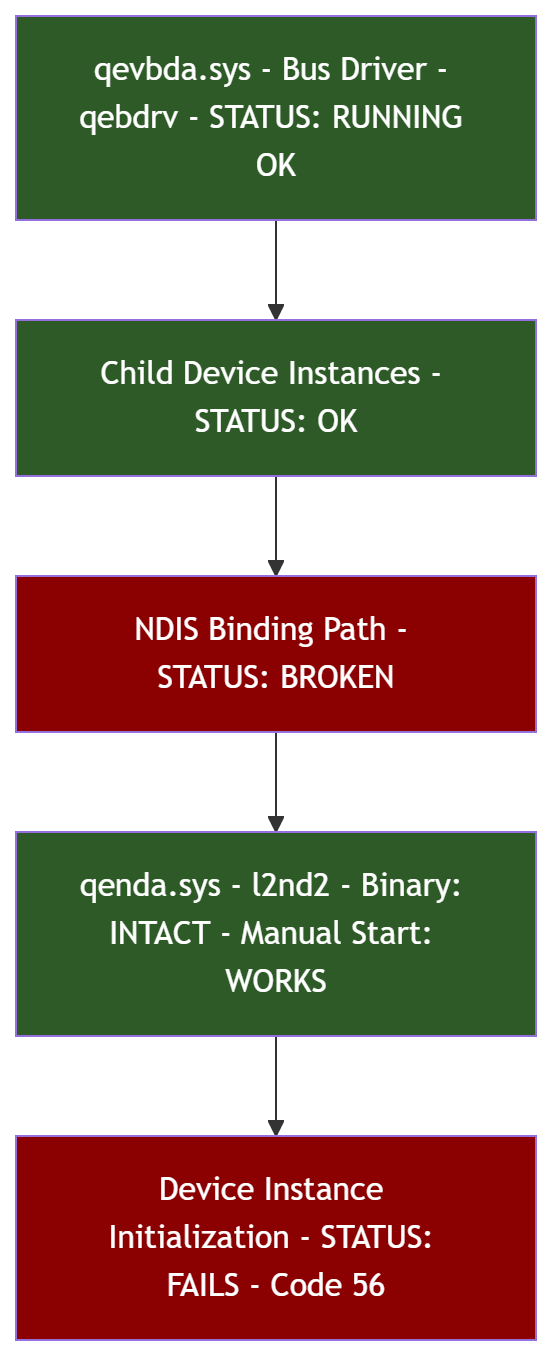
The QLogic FastLinQ adapters use a two-driver stack. First the virtual bus device
driver - qevbda.sys, service qebdrv - loads and enumerates child devices. Then the
NDIS miniport driver - qenda.sys, service l2nd2 - binds to those child devices and
provides the actual network data path. The bus driver was loading fine. The VBD
devices showed OK in Device Manager under System Devices. The problem was the next layer down: the NDIS miniport child devices, showing under Network Adapters, all reporting Error Code 10 and Code 56.
The Dell installer logs told me something useful. When the second Dell driver package ran, it printed a "Version before" column that was a snapshot of the current driver state. The EVBD bus driver was present at version 8.72.21.0. The NDIS Ethernet driver was present at 8.72.1.0. Both were installed. Both were at versions newer than what the installer carried. The installer correctly refused to downgrade them.
But the drivers being staged in the driver store is not the same as them loading.
Something in the NDIS binding layer was broken. The miniport driver existed. The INF was staged. The service registration existed. And still, every adapter came up dead.
That gap - driver present, driver not loading - is where the next ten hours lived.
Confirming the Binary Was Not the Problem
First thing: establish what is actually broken before touching anything.
I staged the qend.inf driver package into the driver store using pnputil and confirmed it was present as oem8.inf. I verified qenda.sys existed in the FileRepository. I copied qenda.sys directly to System32\drivers and verified the file. I checked the l2nd2 service registration in the registry - Start type 3 (demand start), ImagePath pointing to qenda.sys, everything looked correct.
Then I manually started the l2nd2 service.
Start-Service l2nd2
It started. Status Running. No errors.
That result was important. The driver binary was not corrupted. The sys file was
intact, signed, loadable. The problem was not the file on disk. The problem was in
the NDIS plug-and-play binding path - the process by which Windows, during device initialization, loads the driver in the context of a specific device instance and registers it with the NDIS subsystem. That process was broken. The driver itself was fine.
Knowing this narrowed the problem significantly. It was not a bad file. It was a
corrupted registration, a poisoned filter, a broken class configuration - something
in the layer between the device instance and the driver load.
The SentinelOne Dead End
During the Phase 1 reconnaissance, checking filter entries across the Net device
class registry key turned up something worth investigating.
# What the registry showed
# HKLM\SYSTEM\CurrentControlSet\Control\Class\{4D36E972-...}
#   LowerFilters: SentinelDeviceControl
Get-ItemProperty "HKLM:\SYSTEM\CurrentControlSet\Control\Class\{4D36E972-E325-11CE-BFC1-08002BE10318}" | Select-Object UpperFilters, LowerFilters
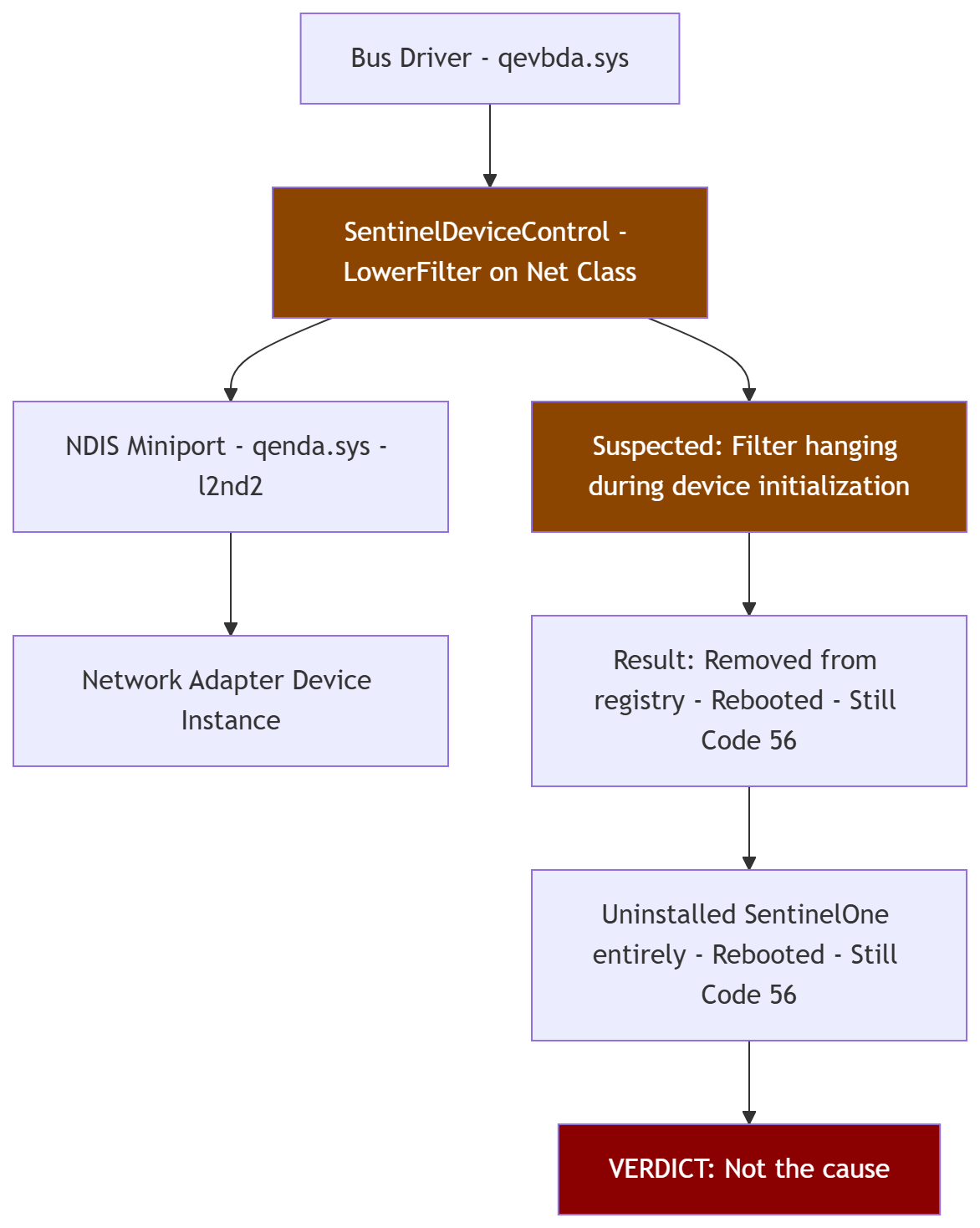
SentinelOne's endpoint security product registers a kernel-mode driver -
SentinelDeviceControl - as a LowerFilter on the Net device class. A LowerFilter
sits between the bus driver and the function driver in the device stack. Every device in that class loads the filter before it loads its own driver. If the filter hangs,
the device hangs. If it times out during a driver installation, you get exactly the
behavior I was seeing: Windows finds the correct driver, starts the installation,
and the operation times out.
That was a plausible explanation. SentinelOne intercepts device installation at the
class level to enforce device control policies. A policy evaluating the QLogic adapter could be blocking or timing out the driver load.
I removed SentinelDeviceControl from the LowerFilters registry value and rebooted.
$netClass = "HKLM:\SYSTEM\CurrentControlSet\Control\Class\{4D36E972-E325-11CE-BFC1-08002BE10318}"
$current = (Get-ItemProperty -Path $netClass -Name "LowerFilters").LowerFilters
$cleaned = @($current | Where-Object { $_ -ne "SentinelDeviceControl" })
if ($cleaned.Count -gt 0) {
    Set-ItemProperty -Path $netClass -Name "LowerFilters" -Value $cleaned -Type MultiString
} else {
    Remove-ItemProperty -Path $netClass -Name "LowerFilters"
}
Still Code 56.
I completely uninstalled SentinelOne using the vendor's official removal process,
rebooted, and confirmed no SentinelOne drivers, services, or registry entries
remained anywhere on the system.
Still Code 56.
SentinelOne was not the cause. It was a plausible suspect and eliminating it was
the right call - but it was not the root. The actual corruption was somewhere else
entirely.
The LBFO Registry Battle
With the filter theory exhausted, attention turned to the LBFO teaming layer. The
three NIC teams - OS_Management, Hyperv_Guest, Storage_Network - were all in a failed state with zero working members. They were holding NDIS binding registrations that referenced the broken adapter instances. The theory: if those teams and their stale bindings were removed, the NDIS subsystem might be able to re-initialize the adapters cleanly.
This is where things got stubborn.
Attempt 1: PowerShell removal.
Removing the Hyper-V vSwitch took two tries - the first failed on a stale port
object, the second succeeded. The Storage_Network team removed cleanly. OS_Management and Hyperv_Guest refused. Error: adapter not enabled. Error: name reserved by another transaction. The teams were too broken to remove through the normal cmdlet path.
# vSwitch removal - second attempt succeeded
Remove-VMSwitch -Name "guest" -Force

# Storage_Network removed cleanly
Remove-NetLbfoTeam -Name "Storage_Network" -Confirm:$false

# These failed
Remove-NetLbfoTeam -Name "OS_Management" -Confirm:$false
# Error: The network adapter is not enabled
Remove-NetLbfoTeam -Name "Hyperv_Guest" -Confirm:$false
# Error: The name is reserved by another transaction
Attempt 2: Direct registry wipe.
LBFO stores its team configuration under:
HKLM\SYSTEM\CurrentControlSet\Services\MsLbfoProvider\Parameters\Teams
HKLM\SYSTEM\CurrentControlSet\Services\MsLbfoProvider\Parameters\TeamMembers
HKLM\SYSTEM\CurrentControlSet\Services\MsLbfoProvider\Parameters\TeamNICs
$lbfoBase = "HKLM:\SYSTEM\CurrentControlSet\Services\MsLbfoProvider\Parameters"
@("Teams", "TeamMembers", "TeamNICs") | ForEach-Object {
    $path = "$lbfoBase\$_"
    if (Test-Path $path) {
        Get-ChildItem $path | ForEach-Object {
            Remove-Item $_.PSPath -Recurse -Force
        }
    }
}
I deleted every subkey under all three. Confirmed zero entries. Rebooted.
The teams came back.
Attempt 3: Adapters and NdisAdapters subkeys.
LBFO also stores configuration in Adapters and NdisAdapters subkeys under the same Parameters path. Wiped those too. Rebooted.
@("Teams", "TeamMembers", "TeamNICs", "Adapters", "NdisAdapters") | ForEach-Object {
    $path = "$lbfoBase\$_"
    if (Test-Path $path) {
        Get-ChildItem $path -ErrorAction SilentlyContinue | ForEach-Object {
            Remove-Item $_.PSPath -Recurse -Force
        }
    }
}
The teams came back.
Attempt 4: Control\Network config store.
LBFO registers its MUX virtual adapter instances in the network configuration store under Control\Network. I found and removed every entry pointing to MS_IMPLAT_MP device instances. Rebooted.
$netBase = "HKLM:\SYSTEM\CurrentControlSet\Control\Network\{4D36E972-E325-11CE-BFC1-08002BE10318}"
Get-ChildItem $netBase -ErrorAction SilentlyContinue | ForEach-Object {
    $conn = Get-ItemProperty "$($_.PSPath)\Connection" -ErrorAction SilentlyContinue
    if ($conn -and $conn.PnPInstanceId -like "*MS_IMPLAT_MP*") {
        Remove-Item $_.PSPath -Recurse -Force
    }
}
The teams came back.
Attempt 5: COMPOSITEBUS device instances.
LBFO creates device instances under:
HKLM\SYSTEM\CurrentControlSet\Enum\COMPOSITEBUS\MS_IMPLAT_MP
representing the virtual multiplexor adapters. I removed those. Rebooted.
$compositeBase = "HKLM:\SYSTEM\CurrentControlSet\Enum\COMPOSITEBUS\MS_IMPLAT_MP"
if (Test-Path $compositeBase) {
    Remove-Item $compositeBase -Recurse -Force -ErrorAction SilentlyContinue
}
The teams came back.
Attempt 6: Disable the services entirely.
I set MsLbfoProvider, NdisImPlatform, and NdisImPlatformMp all to Start=4 (Disabled) so they could not load. Uninstalled the LBFO Multiplexor virtual devices from Device Manager. Rebooted.
@("MsLbfoProvider", "NdisImPlatform", "NdisImPlatformMp") | ForEach-Object {
    $svcPath = "HKLM:\SYSTEM\CurrentControlSet\Services\$_"
    if (Test-Path $svcPath) {
        Set-ItemProperty -Path $svcPath -Name "Start" -Value 4
    }
}
The teams came back. Get-NetLbfoTeam still returned both teams with their full
membership lists.
At this point something became clear. The teams were not rebuilding from registry
config. The registry was empty. They were rebuilding from the WMI repository - the Common Information Model (CIM) database that LBFO uses to persist team definitions independently of the registry. WMI was reconstituting the teams from its own store on every boot, re-creating the registry entries, re-registering the services, and putting everything back exactly as it was.
The LBFO configuration was alive in a place I had not looked.

The Orphaned NDIS Registrations
While working through the LBFO problem, a systematic check of the NDIS filter and protocol registration tables found something else worth cleaning.
Under HKLM\SYSTEM\CurrentControlSet\Control\Network, NDIS maintains registration tables for all filter drivers and protocol drivers. Each entry should have a valid Service field pointing to a running or startable service. A number of entries had empty Service fields - orphaned registrations left behind by SentinelOne's uninstall and by previous LBFO operations.
# Check for orphaned NDIS filter registrations
$filterBase = "HKLM:\SYSTEM\CurrentControlSet\Control\Network\{4D36E974-E325-11CE-BFC1-08002BE10318}"
Get-ChildItem $filterBase -ErrorAction SilentlyContinue | ForEach-Object {
    $ndi = Get-ItemProperty "$($_.PSPath)\Ndi" -ErrorAction SilentlyContinue
    if ($ndi -and [string]::IsNullOrEmpty($ndi.Service)) {
        Write-Host "ORPHANED FILTER: $($_.PSChildName) - Service field empty" -ForegroundColor Red
    }
}

# Check for orphaned NDIS protocol registrations
$protoBase = "HKLM:\SYSTEM\CurrentControlSet\Control\Network\{4D36E975-E325-11CE-BFC1-08002BE10318}"
Get-ChildItem $protoBase -ErrorAction SilentlyContinue | ForEach-Object {
    $ndi = Get-ItemProperty "$($_.PSPath)\Ndi" -ErrorAction SilentlyContinue
    if ($ndi -and [string]::IsNullOrEmpty($ndi.Service)) {
        Write-Host "ORPHANED PROTOCOL: $($_.PSChildName) - Service field empty" -ForegroundColor Red
    }
}
I found ten orphaned entries in total: two NDIS filter registrations with empty
Service fields, several LBFO filter and protocol entries pointing to the disabled
services, and several protocol entries - vmswitch, SMB, tunnel protocols - with
empty or stale Service references.
Surgically removed all ten. Rebooted.
Still Code 56. Clean NDIS registration tables did not fix the miniport initialization
failure. Useful cleanup, wrong diagnosis.
netcfg -d: The Tool That Made It Worse
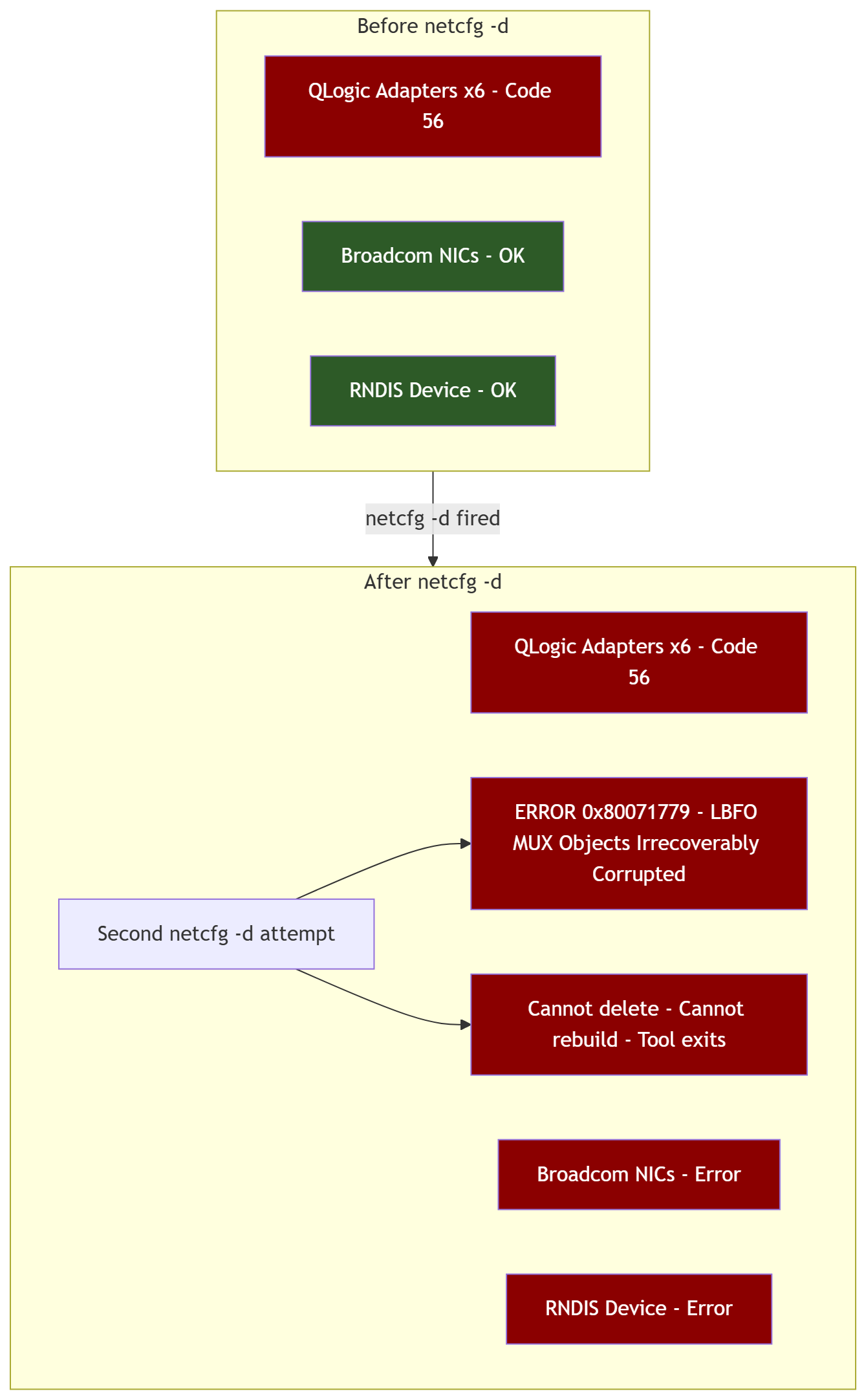
netcfg -d is the right weapon for a poisoned network class configuration. It resets
the entire NDIS binding database - removes all network adapters, protocols, clients, and services from the network configuration state, then forces Windows to re-enumerate and rebuild everything on next boot. For a Code 56 failure caused by a corrupted class configuration, it is the correct call.
I ran it.
netcfg -d
On reboot, the failure expanded. Previously only the six QLogic adapters were showing Code 56. After netcfg -d, the Broadcom adapters and the RNDIS device also showed errors. The blast radius grew.
I ran netcfg -d a second time.
ERROR: NetSetupDeleteObject on MUX 0x80071779
The LBFO MUX intermediate driver objects - the virtual bus objects that LBFO uses to present multiplexed team adapters to the OS - were irrecoverably corrupted. netcfg -d could not process them. It could not delete them. It could not rebuild around them.
The MUX objects were stuck in a state that the network configuration subsystem could not handle.
This was the moment the scope of the damage became fully clear. It was not a filter
entry or an orphaned registration or a stale LBFO team definition. The NDIS binding infrastructure itself was damaged at a layer below what any running-OS tool could repair.
The vmswitch Investigation
One more avenue worth checking: the Hyper-V virtual switch components. vmsmp and VMSP were still running. The external vSwitch had been removed but the underlying services remained loaded. A hung or misbehaving vmswitch component could theoretically interfere with NDIS miniport initialization on the adapters it had previously used.
# Disable vmswitch-related services
@("vmsmp", "VMSP", "VmsProxy", "netvsc", "netvscvfpp") | ForEach-Object {
    $svcPath = "HKLM:\SYSTEM\CurrentControlSet\Services\$_"
    if (Test-Path $svcPath) {
        Set-ItemProperty -Path $svcPath -Name "Start" -Value 4
        Write-Host "Disabled: $_"
    }
}

# Remove netvscvfpp protocol registration
$protoBase = "HKLM:\SYSTEM\CurrentControlSet\Control\Network\{4D36E975-E325-11CE-BFC1-08002BE10318}"
Get-ChildItem $protoBase -ErrorAction SilentlyContinue | ForEach-Object {
    $ndi = Get-ItemProperty "$($_.PSPath)\Ndi" -ErrorAction SilentlyContinue
    if ($ndi -and $ndi.Service -eq "netvscvfpp") {
        Remove-Item $_.PSPath -Recurse -Force
        Write-Host "Removed netvscvfpp protocol registration"
    }
}
All adapters still Code 56. vmswitch was not the cause.
I re-enabled all previously disabled services, restored their original Start values,
re-cleaned the LBFO configuration, and ran netcfg -d one more time. Rebooted. Still Code 56 across every adapter. Still the MUX corruption error from netcfg.
# Re-enable all services - restore original Start values
# vmsmp, VMSP, VmsProxy = Start 3 (Manual)
# netvsc, netvscvfpp = Start 3 (Manual)
@("vmsmp", "VMSP", "VmsProxy", "netvsc", "netvscvfpp") | ForEach-Object {
    $svcPath = "HKLM:\SYSTEM\CurrentControlSet\Services\$_"
    if (Test-Path $svcPath) {
        Set-ItemProperty -Path $svcPath -Name "Start" -Value 3
    }
}
SFC, DISM, and the Limit of Running-OS Repair
At this point the rational next move was Windows system file repair - the built-in
tools that check for corrupted OS files and restore them from the component store
or a mounted ISO.
sfc /scannow
Hung. No output. No progress. Indefinite wait.
DISM /Online /Cleanup-Image /RestoreHealth
Also hung. No output.
The corrupted NDIS stack was blocking the servicing infrastructure from running.
Both tools depend on network-aware components during their operation, and with the network stack in this state they could not complete.
I booted into Safe Mode - minimal drivers, no network stack loaded - and ran SFC
from there.
sfc /scannow

Windows Resource Protection did not find any integrity violations.
It completed. The result: no integrity violations found. Windows resource protection did not find any corrupted system files.
That result was both good news and bad news. Good news: the underlying system files were intact. Bad news: the problem was not in a file that SFC could see. It was in the state of the NDIS registry and binding database, which SFC does not touch.
I rebuilt the WMI repository by renaming the Repository directory under System32\wbem to Repository.old and restarting the winmgmt service, forcing WMI to rebuild its database from scratch. Rebooted to normal mode. WMI rebuilt cleanly.
# Rebuild WMI repository
Stop-Service winmgmt -Force
Rename-Item "C:\Windows\System32\wbem\Repository" "Repository.old"
Start-Service winmgmt
But LBFO was back in WMI's new repository within seconds of the service starting,
because the LBFO provider re-registers itself from persistent storage that survives
the WMI rebuild.
The teams came back. The adapters stayed broken.
The Decision Point
Ten hours across two days. Here is the complete list of what was tried:
- Driver reinstallation through every available method
- Dell Pro Support escalation with two separate driver packages
- SentinelOne removal - confirmed not the cause
- Manual binary verification - driver loads fine when started directly
- LBFO registry wipe across six separate registry locations - teams rebuilt from WMI every time
- Orphaned NDIS filter and protocol registration cleanup - ten entries removed
- netcfg -d - expanded the failure, hit irrecoverable MUX corruption error 0x80071779
- vmswitch service disablement - not the cause
- SFC in Safe Mode - no integrity violations found
- WMI repository rebuild - LBFO re-registered immediately
Every targeted repair approach had been exhausted. The NDIS binding state was
corrupted in a way that no running-OS tool could reset. The MUX objects were stuck.
The servicing tools could not run against the live stack. SFC found nothing wrong
with the files but the system was still broken.
The only remaining option was to replace the NDIS subsystem itself - not patch it,
not reset it, not surgically repair it. Replace it entirely. That means a Windows
Server in-place repair installation.

What This Teaches About NDIS Corruption
A few things worth understanding before you find yourself here.
Code 56 is not a driver file problem. The driver binary was intact, loadable,
and running fine when started manually. Code 56 in this context means the NDIS
class configuration state is corrupted - the data structures that track which
miniport is registered for which device class, what filters are bound, what the
binding order looks like. That state lives in the registry and in memory, and when
it is broken enough, nothing short of a full rebuild fixes it.
LBFO has multiple persistence layers. The registry is only one of them. WMI
maintains its own copy of team configuration. When you wipe the registry, WMI
restores it. When you rebuild WMI, the LBFO provider repopulates it from its own
persistent storage. You cannot outrun it with registry surgery alone.
netcfg -d is a weapon, not a scalpel. Run it on a system with corrupted MUX
objects and you may expand the failure rather than contain it. Know what state your NDIS binding database is in before you fire it. If the MUX objects are already
corrupted - which you can verify by looking for the 0x80071779 error on a second
run - netcfg -d cannot help you and may hurt you.
When SFC runs clean and the system is still broken, the problem is state, not files. This is the diagnostic gap that burns the most time. Engineers trust SFC.
If SFC says clean, the instinct is to look harder for a file problem. In NDIS
corruption cases, the damage is in registry structures and binding state that SFC
does not evaluate. Clean SFC result with persistent Code 56 means it is time to
stop trying to repair and start thinking about replacement.
The next article covers what happened after the repair install: the network rebuild
from scratch, the iSCSI reconnection, and the cluster rejoining problem that nobody saw coming until I was staring at the cluster log.